Video Traceability for Production Lines
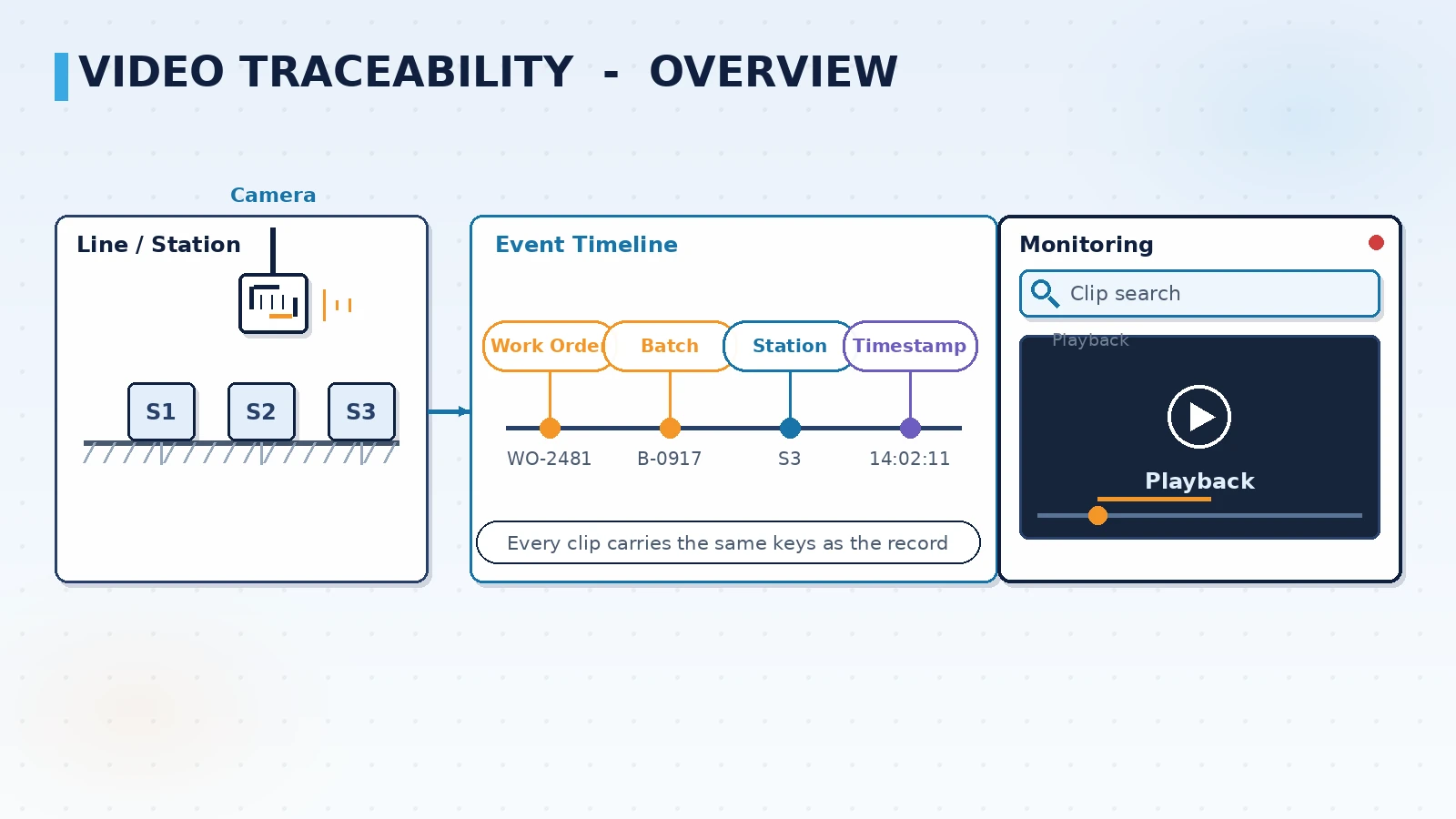
A video traceability system solves one problem: when a defect or customer complaint appears, you can pull up the recording of the right station at the right second in minutes instead of scrolling through drives. It aligns work order, batch, station and timestamp with recorded clips to form a searchable video index. This article covers trigger and retention rules, storage and bandwidth estimation, index alignment with MES, playback and export, and the points to verify during selection and acceptance.
Why production lines need video traceability
Paper records and electronic logs can answer which batch, which machine and what time, but they rarely answer what actually happened on the line. Video traceability fills that gap: it binds the picture and the record to the same moment, so an anomaly moves from after-the-fact inference to something you can see.
- Complaint handling: once a defective part is in hand, go straight to the station and the moment instead of searching recordings one by one
- Dispute resolution: whether a part was seated, missed or manually mis-handled, the picture is more convincing than a log entry
- Process improvement: replaying the moments around a defect helps process and equipment teams find the cause together
- Audits and compliance: customer and system audits often require that an anomaly can be traced back to the line condition at the time
Video traceability is not non-stop recording of everything; its value comes from aligning with business events, because a clip that cannot be searched only occupies disk space.
Trigger rules: when to record and how long to keep it
Continuous recording is the least effort to run but the worst for both storage cost and retrieval efficiency. A common approach is continuous low-bitrate baseline plus high-bitrate event archive, so critical clips stay clear and available.
- Event triggers: work order changes, batch changes, NG verdicts, equipment alarms and andon calls start an archived clip
- Manual triggers: a station button or a supervisor's mobile app marks the section to keep, useful for trial runs and anomaly observation
- Time window buffering: keep a margin before and after the event, so you capture the process and not only the outcome
- Tiered retention: ordinary stations overwrite on a short cycle, while critical processes and high-traceability stations get longer retention
- Trigger sources aligned with MES events: an NG verdict, an alarm or a work order change must carry station and batch context, otherwise the clip cannot be attributed
- Local cache on network loss: the edge device writes to disk first and uploads the index and clip after recovery
Estimating storage and bandwidth
Capacity questions come up in almost every design review. The reliable approach is to give the formula first and the configuration second, rather than starting from a number of hard drives.
| Item | How to estimate | Main driver |
|---|---|---|
| Storage per channel | Bitrate x hours per day x retention days | Resolution, frame rate and codec set the bitrate |
| Total storage | Storage per channel x channels x redundancy factor | Channel count and the share of event archive |
| On-site bandwidth | Concurrent preview channels x bitrate per channel | Whether the link is shared with the office network |
| Uplink bandwidth | Clip size x events per day | Whether the uplink carries index only or clips |
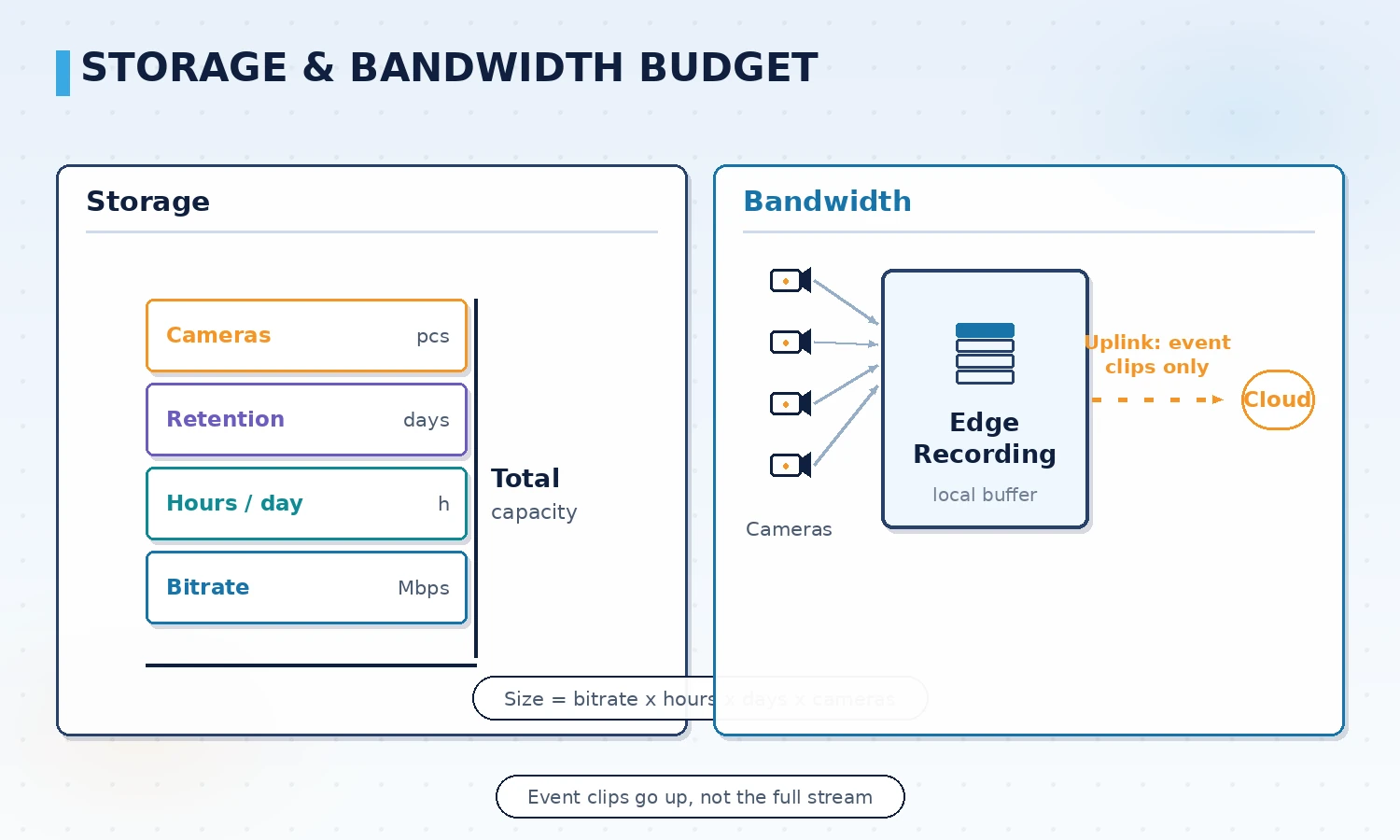
Common practice is to record at the edge and upload only event clips and the index to the center, so uplink bandwidth is driven by the number of events rather than the number of cameras and network upgrades are far lighter.
Aligning with MES, work orders and batch numbers
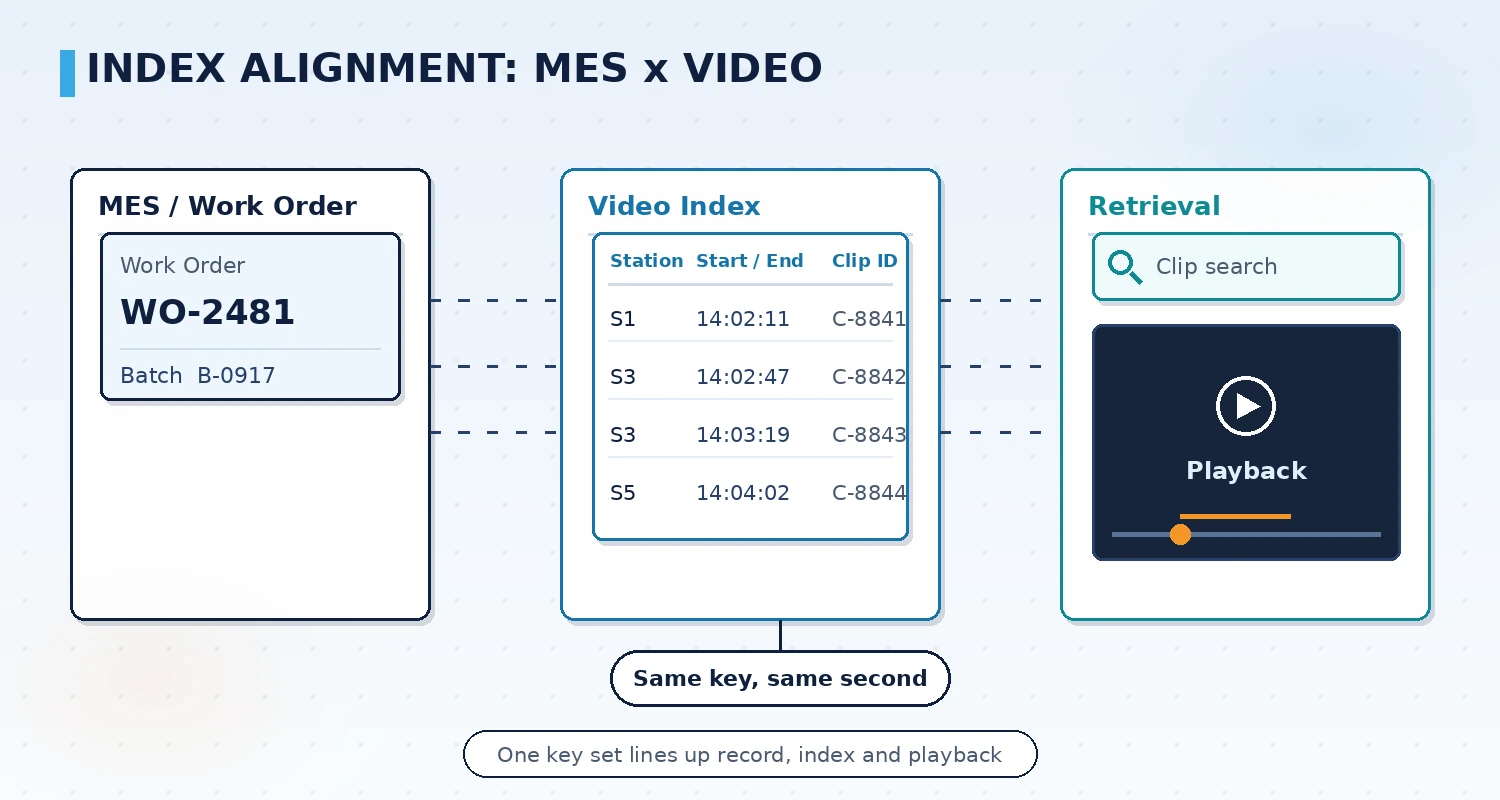
Whether the video index is usable depends on how it aligns with business data. When alignment is done well, retrieval means typing a work order number and getting the clip; when it is not, you fall back to scrolling a timeline by hand.
- Common keys: use work order, batch, station and timestamp as a combined index key, since missing any one of them breaks retrieval
- Clock sync: cameras, edge recorders and the MES server need one time source, or the drift puts playback at the wrong moment
- Station binding: the camera-to-station mapping must be registered in the system and maintained when the line is rearranged
- Interface boundary: integration with MES usually runs on event push or database views, so fields and frequency should be confirmed item by item before work starts
Playback, search and export
The search experience decides whether the system actually gets used. If no one is willing to spend twenty minutes finding a clip during a shift, the system sits idle.
- Multi-criteria search: combine work order, batch, station, time range and event type in one query
- Multi-view playback: when one event spans several stations, replay them in sync on a timeline to see the sequence
- Clip export: cut and export sections for complaint handling, internal review and audit records
- Permissions and audit trail: viewing and exporting need role-based control and an operation log to meet data compliance requirements
How it relates to machine vision inspection
Video traceability and machine vision inspection are two different things, and they are often implemented together. Vision decides whether a part is good; video traceability records how the part was made.
- Source of judgment: the vision system outputs OK or NG and its parameters, while the video system records the frames around the verdict
- Mutual evidence: an NG verdict automatically archives the matching clip, so there is a picture to check against the criteria
- Merged index: batch and station information from vision results feeds into the video index, giving one search entry point
- Clear split of duties: algorithm accuracy for vision and image clarity for video are two different metrics and should not be mixed up in selection
ORPAON has developed industrial software and automation systems since 2009, with project practices in shop floor data acquisition, visualization and quality traceability. Its delivery scope covers production line data acquisition, station visualization and traceability recording systems, and it provides scheme design and system development for automotive parts, electronics assembly and similar scenarios, with engineers available for direct contact.
A phased rollout path
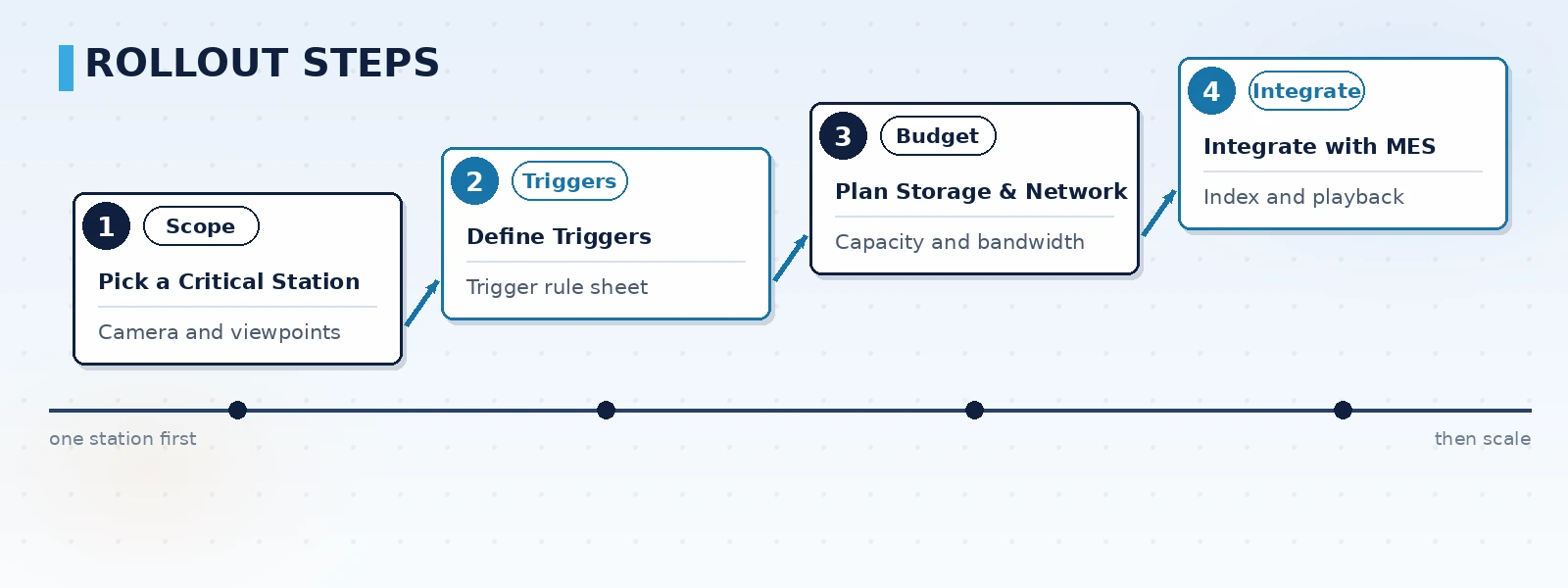
Video traceability is best not rolled out across the whole plant at once. Start with one critical line, settle the rules and the capacity, and then copy the result with the least risk.
- Pick a critical line: choose the line with the strongest traceability requirement or complaint pressure as the pilot and define the questions it must answer
- Define triggers: work with process and quality teams to fix the event list, time window and retention period as a rule table
- Budget storage and network: calculate storage, on-site bandwidth and uplink bandwidth with the formulas above, then decide the edge recording and upload strategy
- Integrate with MES and accept: complete index alignment, permissions and export, then run an end-to-end retrieval exercise based on a real complaint scenario
Points to verify during selection and acceptance
- Alignment capability: can a work order, batch and station return the matching clip within minutes, rather than a manual search along a timeline
- Clock and cache: do cameras, recorders and MES share one time source, and does the edge cache data and upload it after a network outage
- Storage policy: are bitrate, frame rate and retention tiered by process, with critical stations given longer retention
- Interface boundary: are the fields, frequency and exception handling for MES or vision integration confirmed item by item
- Permissions and compliance: are viewing, exporting and deletion role-based with an operation log that satisfies customer audits
Conclusion
The value of video traceability is not in the recording itself, but in binding the picture and the business event into a searchable index. Start with one critical production line, define the trigger rules and retention period first, then estimate storage and bandwidth, and finally align the index with MES and rehearse retrieval against a real complaint scenario. During selection, verify five things: alignment capability, clock and cache behaviour, tiered storage, interface boundary and permission compliance, so the system does not end up installed but unable to find a clip. ORPAON provides scheme design and development of data acquisition, visualization and traceability recording systems for automotive parts, electronics assembly and food packaging lines, supporting integration with MES and vision inspection systems, with engineers available for direct contact.
Discuss your video traceability plan
Tell us the number of lines, the critical processes that need traceability and your existing cameras and MES, and we can outline trigger rules, a capacity estimate and an index alignment approach for your site, with direct access to our engineers.
Contact Us