How to Integrate a Mobile Inspection App with MES
A practical way to integrate a mobile inspection app with MES is this: inspection tasks are dispatched by MES rather than arranged by hand, operators verify equipment and check points by scanning, inspection data is stored locally while offline and uploaded automatically after reconnection, and any exception raises a work order that is closed and recorded inside MES. Once that loop works, an inspection is no longer a tick on a paper sheet but a searchable, accountable record in the production management system.
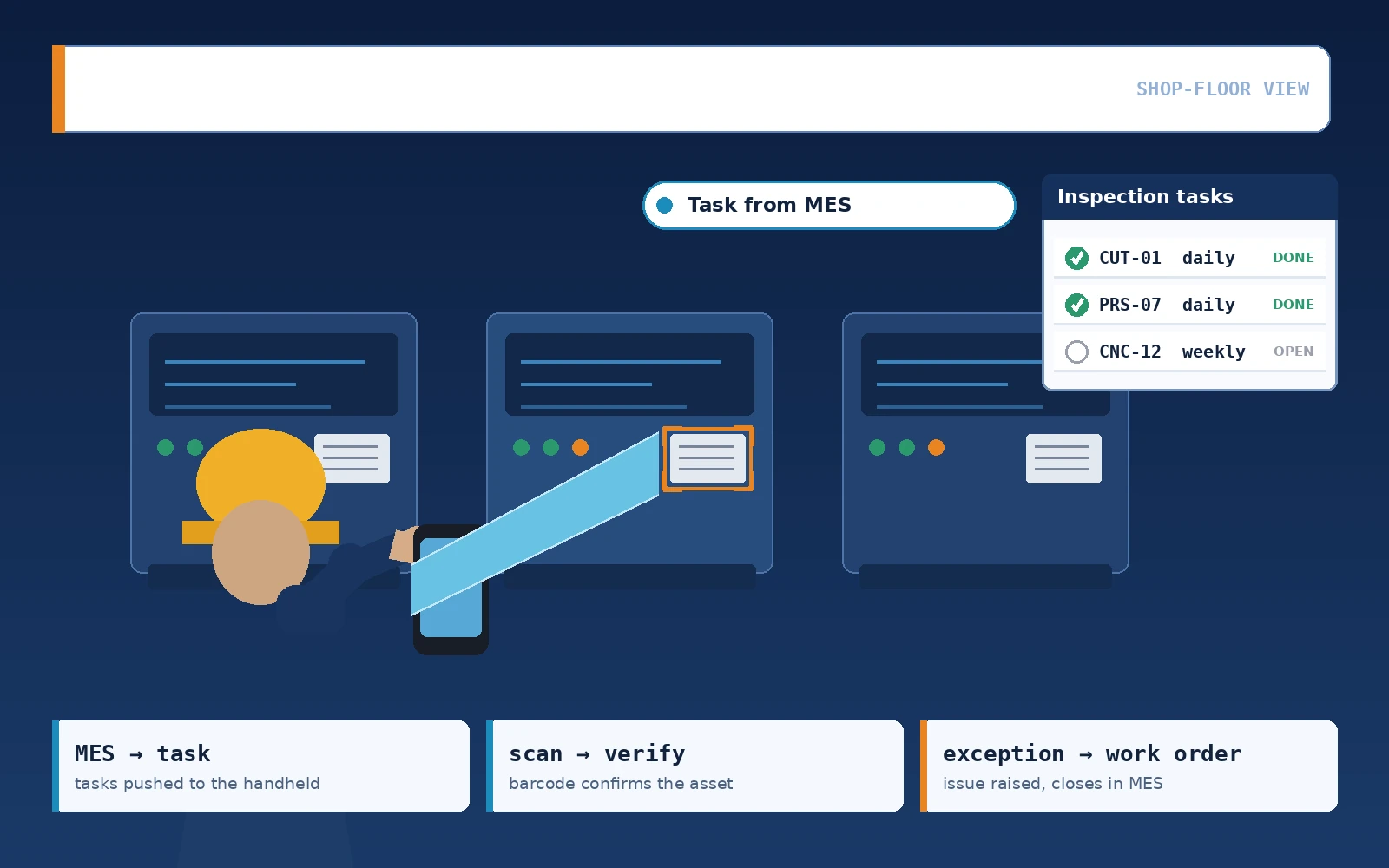
How mobile inspection differs from a paper check sheet
Many plants claim to "have inspections": a check sheet hangs on the wall, staff tick it per shift, and the sheets are collected at month end.
The cost of that approach is invisible most of the time. It shows up in three moments: a customer audit that asks for records, a breakdown that requires knowing the condition at the time, and a regulator who wants proof that a specific check was actually performed. All three share the same problem — time is short, and nobody wants to dig through a year of paper.
A mobile inspection app differs in three ways:
- Task dispatch is system-driven, not called out by a team leader: who, when, which equipment and which items are already recorded before the shift starts
- Check items are structured fields, not ticks: numerical items accept a reading, out-of-range values raise an immediate prompt, and photos and timestamps are stored together
- An exception is the start of a process, not the end: it raises a work order or alert on the spot instead of waiting for end-of-month consolidation
A practical test: pick any inspector at random. If the system can show every inspection time and every reading they recorded last month, the mobile inspection process is genuinely in place.
Which functions a mobile inspection app usually covers
A mobile client is not a web page squeezed onto a phone. It carries the complete set of tasks a frontline operator performs.
The functions usually fall into the four groups below; projects should scope them according to site reality:
| Function group | Typical features | Value on site | Question to settle upfront |
|---|---|---|---|
| Inspection work | Task receipt, scan-based location, numerical entry, photo upload | Inspection evidence captured on the spot | Enforce location tracking or not |
| Exception handling | Exception reporting, tiered dispatch, resolution feedback, closure confirmation | Every issue has an owner and a deadline | Who is allowed to close an exception |
| Mobile reporting and material calls | Work order reporting, line-side material calls, stock count confirmation | Shop floor and planning share one source | Whether it replaces the existing paper routing sheet |
| Equipment records and lookup | Scan to view asset history, past records, spare part data | Asking a colleague becomes self-service | Who maintains the master data |
There is no need to launch all four groups at once, but inspection and exception handling should go live together. Inspection without handling leaves data sitting in the system with nobody following up.
Synchronisation and offline capability: keeping the chain intact on weak networks
On a real shop floor, signal is poor in corners, basements and electrical rooms. If the app requires a live connection to work, an inspector simply cannot work there.
The common approach is online-first with an offline fallback:
- Inspection tasks and equipment records are pre-fetched to the device before departure, so they open without a network
- Entered data is written to a local database first, and the interface shows a clear count of records pending synchronisation
- After reconnection the data uploads automatically, carrying the original timestamp rather than the upload time
- Failed uploads support retries and a manual trigger, so recovery does not depend on one person remembering to press a button
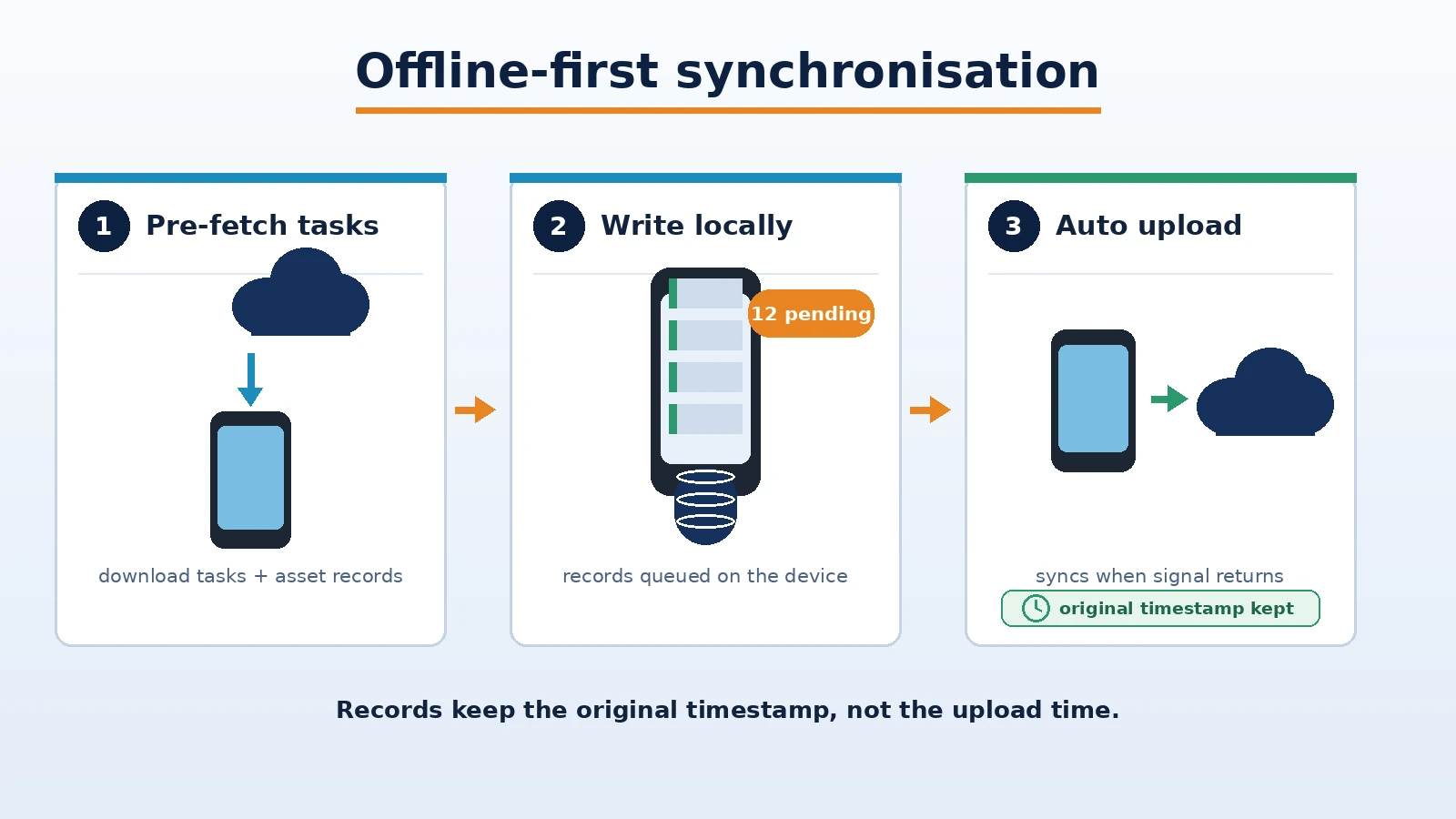
The timestamp detail is easy to overlook. If the upload time is written instead, all records from the offline period collapse together on the timeline, and later trend comparisons or event reconstruction will read the wrong sequence.
Choosing among three ways to integrate with MES
In practice, the connection between a mobile inspection app and MES falls into three directions:
- Task dispatch: MES generates inspection tasks from the maintenance plan and pushes them to the mobile client — this is the step that makes inspection genuinely controlled
- Data return: inspection records, exception work orders and resolution results are written back to MES, forming a complete record of both equipment and people
- Master data: equipment records, check point lists, personnel and account permissions stay consistent with MES, avoiding two sets of equipment numbers
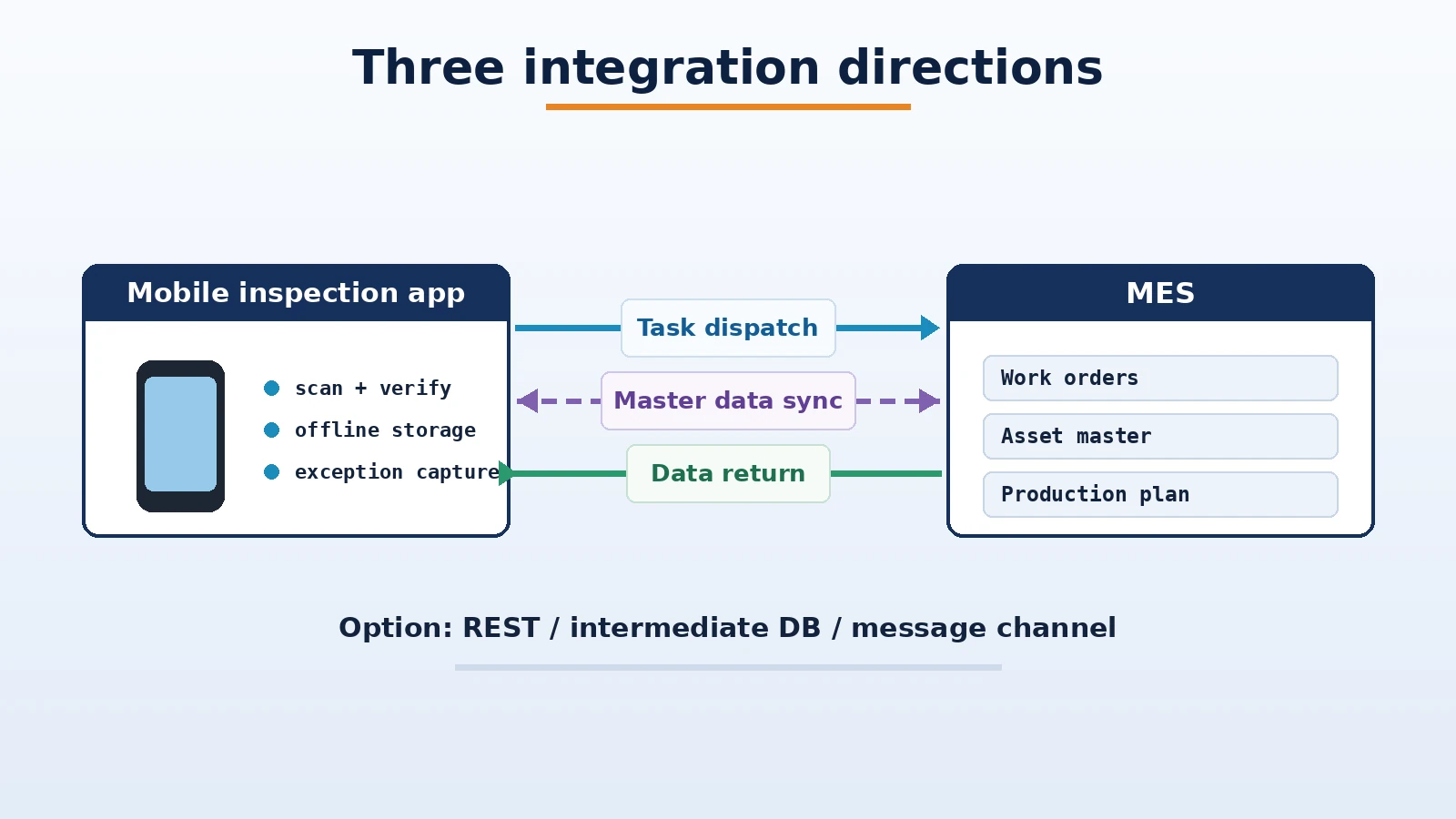
Which technical path to take depends on the interface conditions on both sides. Common options are direct REST integration, exchange through an intermediate database, or asynchronous transfer over a gateway and message channel. None is universally superior: data that needs high timeliness suits a direct interface, cross-network or cross-security-domain scenarios suit a message channel, and master data is usually fine as a daily or per-shift batch.
Choosing terminals: Android phones, handheld terminals or tablets
Whether mobile software lands on the shop floor depends largely on choosing the right terminal.
The three common form factors trade off as follows:
| Terminal | Suitable for | Environmental fit |
|---|---|---|
| Android phone | Inspection, reporting and approval work driven by manual entry | Portable; needs a protective case in dim or damp workshops |
| Handheld terminal | Heavy scanning, stock counts, goods receipt and issue checks | Built-in scan engine, high barcode read rate, grip suited to long shifts |
| Android tablet | Viewing drawings, checking dashboards, batch confirmation | Large screen, easier for check sheets with many detailed items |
The recommended order is: define the operating actions first (more scanning or more typing), then the terminal form factor, and only then the brand and model. Buying devices first and looking for a scenario afterwards is the most common waste in such projects.
Accounts, permissions and audit trails
A mobile client brings the system onto the shop floor, so permission design cannot simply copy office practice.
Four things usually need to be settled:
- Account-to-person binding: how accounts are issued and revoked for interns, temporary staff and contractors
- Role tiers: inspectors may only enter data, team leaders may confirm, and only the equipment supervisor may close an exception
- Change logging: whether data can be edited after entry, whether edits leave a trace, and who is allowed to edit
- Time and location data: whether operation time and location are recorded, with the scope communicated to staff before the project starts
The last two matter especially in heavily regulated industries such as pharmaceuticals and food. Confirm them with the quality department during solution design rather than adding them after go-live.
Go-live and acceptance: how to judge whether the app actually works
Disputes in inspection projects rarely concern missing features. They usually concern whether the shop floor still uses the app after go-live.
Acceptance testing should proceed step by step:
- Task dispatch test: generate one inspection task from MES and confirm it appears on the mobile client within seconds
- Offline scenario test: complete a full inspection in a no-signal area, then check the uploaded records and original timestamps after reconnection
- Exception closure test: report one exception on site and run the full dispatch, resolution and confirmation flow, verifying the MES record is complete
- Scan accuracy test: sample barcode reads under real lighting and oil contamination, confirming the scan does not need repeated aiming
- Permission test: verify the operable scope with accounts of different roles and confirm unauthorised actions are blocked
- Willingness check: run one real shift as a trial, gather inspector feedback, and then finalise the check items
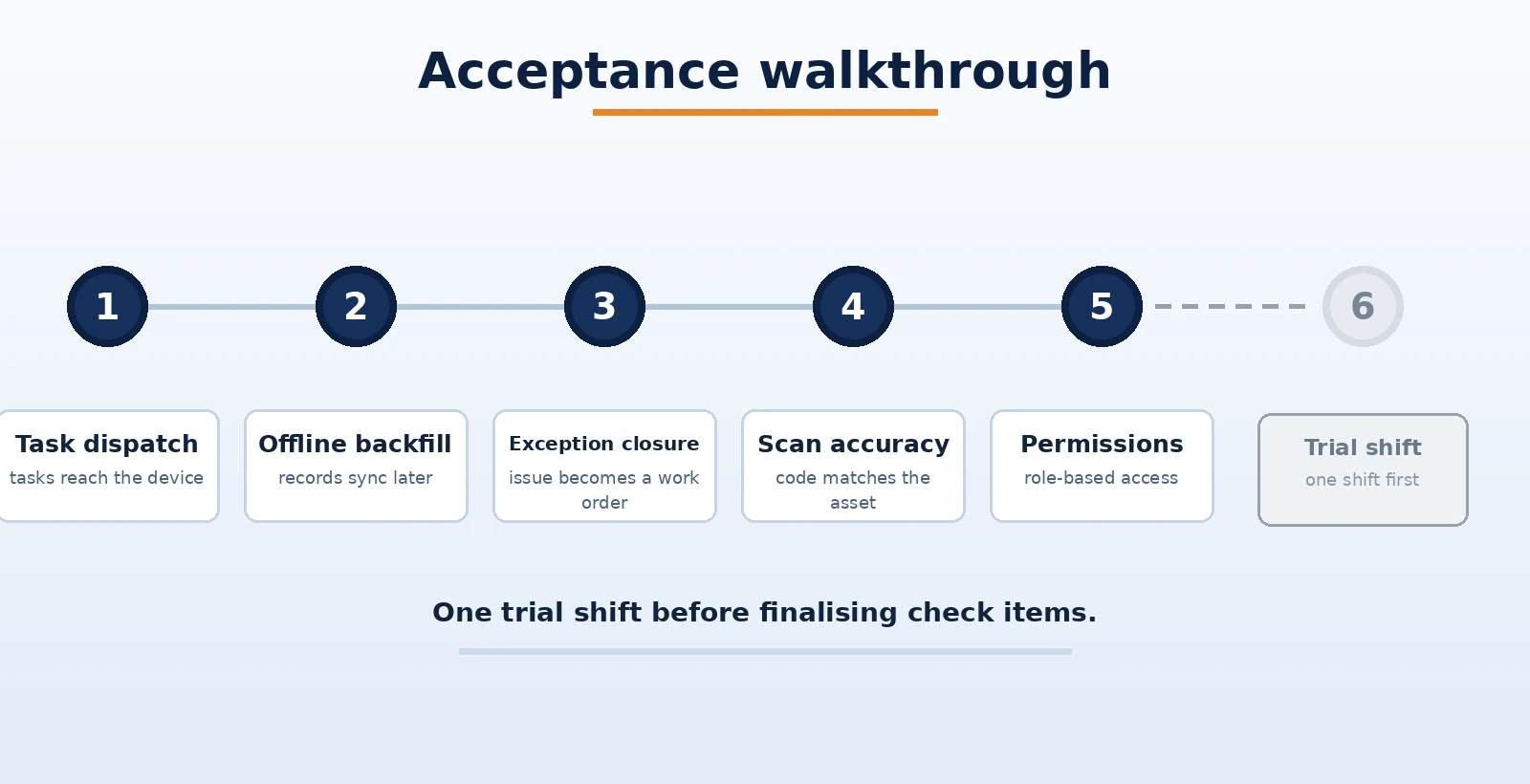
The last step is often skipped and usually costs the most. Check items that are too detailed push frontline staff to find workarounds; items that are too coarse leave no evidence during an audit. One trial shift before finalising is far more effective than arguing in a meeting room.
Delivery boundary: how to scope a pilot and how to roll it out
The landing risks of an inspection app concentrate in two places: the on-site conditions of terminals and networks, and the ownership of interfaces with other systems. Writing the boundary down clearly saves a great deal of later explanation.
A stable approach is to pilot in one workshop or on one line, prove out the three chains of task dispatch, offline backfill and exception closure, and then replicate to other areas. The cost of replication lies mainly in issuing terminals and opening accounts; on the software side it usually means adjusting check items and check point configuration.
Delivery status is normally expressed in three tiers: delivered (already in operation on site), deliverable (proven approach and practice that can start immediately under site conditions), and customisable pilot (validated against specific site conditions). Where interfaces to existing MES, ERP or warehouse systems are involved, bring field definitions and responsibility boundaries into the same scoping round — once interface fields are fixed, later changes cost far more than one extra round of discussion upfront.
Summary: turning inspection into a searchable record
The value of a mobile inspection app is not replacing paper with a phone. It is making every inspection a searchable, traceable and accountable record in the system. When selecting a solution, ask three questions first: can tasks be dispatched from the system, how is data captured offline, and does an exception have an exit into a closed loop. Once those are settled, terminals and interfaces are the easiest part.
Shanghai Chengxuan Intelligent has focused on manufacturing digitalisation since 2009 and has accumulated 600+ project and solution engagements across data acquisition, mobile applications, quality traceability and remote service, supporting mobile application development and on-site rollout for inspection, reporting, material calls and exception handling scenarios.
Book a mobile inspection scenario discussion
Tell us how inspections are currently run, what terminals are available and what interfaces already exist. We will prepare a practical rollout proposal for mobile inspection and system integration based on your situation.
Contact Us