Digital Work Instructions: Content, Versions, Error Proofing
A digital work instruction system converts the paper standard operating procedure into electronic instructions that an operator retrieves by scanning at the station, under version control and with step-level checks, so every task shows the current revision and every skipped step can be recorded and flagged. It is not a PDF moved onto a tablet: it breaks process documents into operations, actions, parameters and criteria, then governs execution through versions, roles and records. The sections below cover the system boundary, content breakdown, version distribution, error proofing and acceptance.
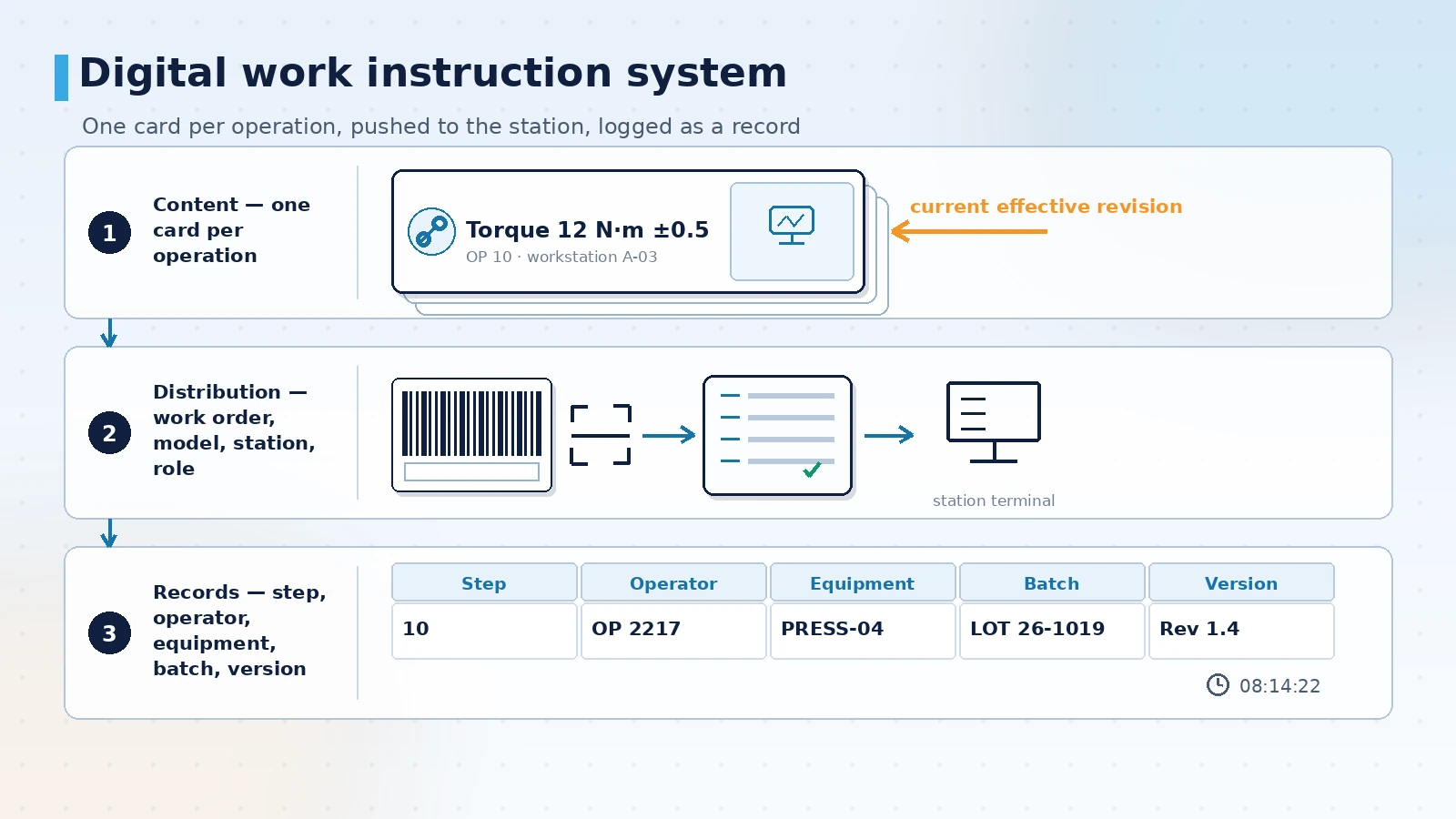
What the system covers: content, distribution and records
A digital work instruction system works at three levels. At the content level, process documents are broken into one card per operation, and each card states the action steps, key parameters, images and acceptance criteria. At the distribution level, the right version is pushed to a station terminal, tablet or scan point according to work order, model, station and user role. At the record level, every execution, confirmation and deviation is stored with a timestamp and the version number that was shown. The system covers whether standard work can be seen, followed and evidenced at the station. It does not control machine motion, define the process itself or decide product design changes, but those changes have to reach the station content, otherwise version discipline breaks down.
Compliance is one direct reason such a system exists. ISO 9001:2015 clause 7.5 requires documented information to be identified, reviewed, approved, distributed and change-controlled. IATF 16949:2016 requires production control and work documents to be available at the workstation. ISO 13485:2016 clause 4.2.4 sets comparable document control requirements for medical devices. Pharmaceutical and food operations also have to handle electronic records: 21 CFR Part 11 has applied to electronic records and signatures since 1997, and EU GMP Annex 11, effective in 2011, addresses access control, audit trails and data integrity in computerised systems. The common thread is that the current version appears in the right place, superseded versions are not reused, changes have an owner, and records can be traced.
A common misjudgement is to scan paper SOPs into PDF files, put them on a tablet or a shared drive, and call the job done. The result is that people find content by file name, confirm versions by asking a colleague, and cannot show whether a step was executed. Three things decide the outcome instead: whether content is broken down to one action per step, whether versions have an effective time and a freeze rule, and whether records land on a specific station and a specific batch. Screen design comes last.
Building the content: splitting one SOP into executable units
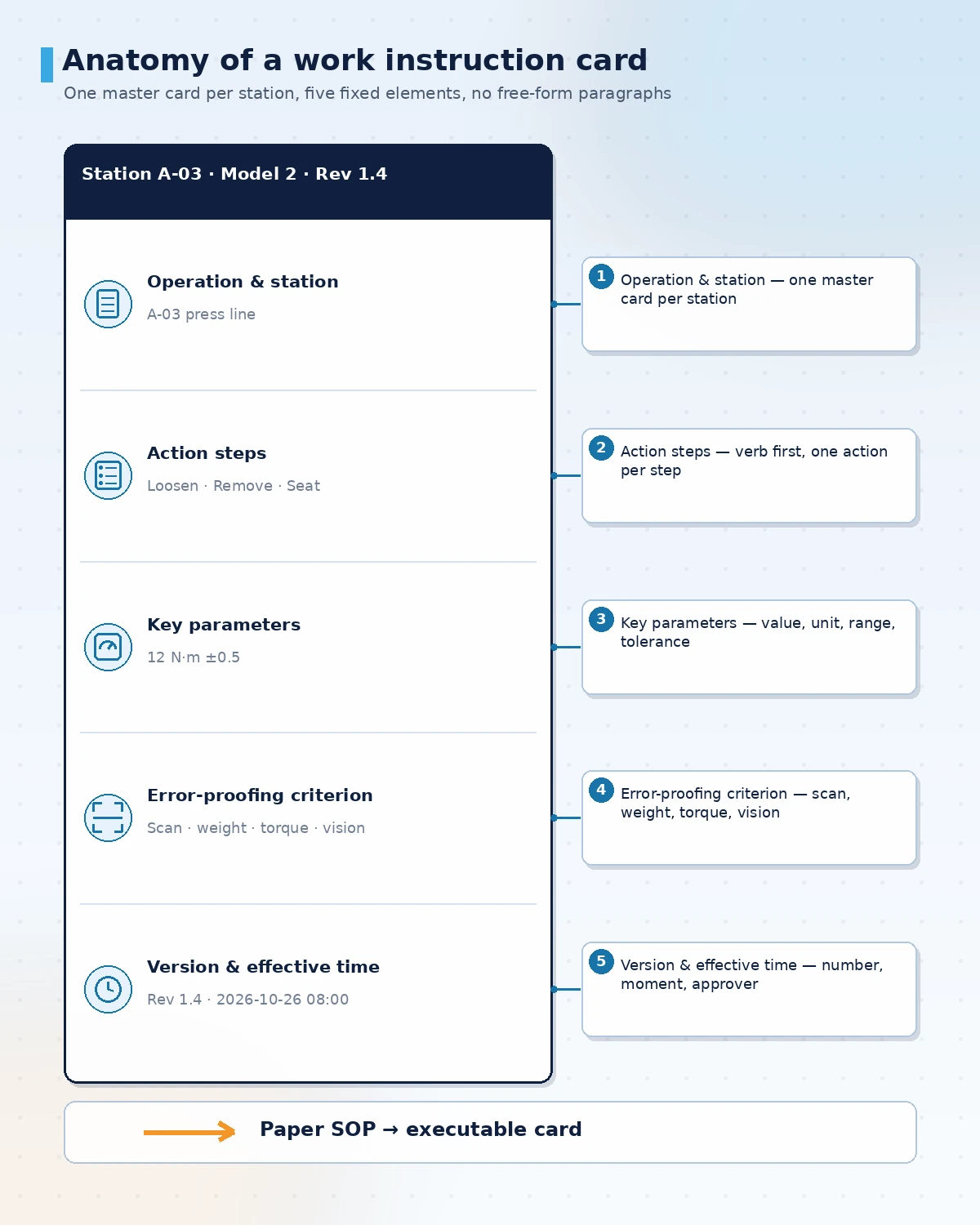
Split by station boundary and by the smallest action. One operation maps to one card, and the card shows only what this station, this model and this revision need. A simple test tells you whether the split is fine enough: can a new operator complete the step and judge the result without a senior colleague standing next to them? If not, the card still relies on verbal knowledge.
Four rules apply to the writing. Start each step with a verb (fit, tighten, insert, inspect); write one action per step; make the acceptance criterion something that can be measured or observed (a torque value, an audible click, a colour difference, a scan result); attach images and video to the specific step rather than the end of the document. Phrases such as "assemble as required" or "apply appropriate force" have to become checkable criteria, otherwise the system records only that someone pressed confirm, not that the step was done correctly.
| Element | Writing rule | What it enables | Frequent problem |
|---|---|---|---|
| Operation and station | One master card per station, with model and applicable revision | Scanning returns only this station and model | One document for the whole plant, operators page through it |
| Action steps | Verb first, one action per step, fixed sequence | Step-by-step confirmation that matches sequence checks | Three actions in one step, so confirmation is a single tick |
| Key parameters | Value, unit, range and tolerance | Parameters can be captured or entered and compared | "Moderate" or "by experience", which cannot be judged |
| Error-proofing criterion | Observable signal: scan, weight, torque, vision or interlock | Gives a machine-readable answer to "was it done right" | Text only, so the system cannot verify anything |
| Version and effective time | Version number, effective moment, supersession and approver | Old and new versions can be traced at switchover | Only the file name changes, old copies stay in use |
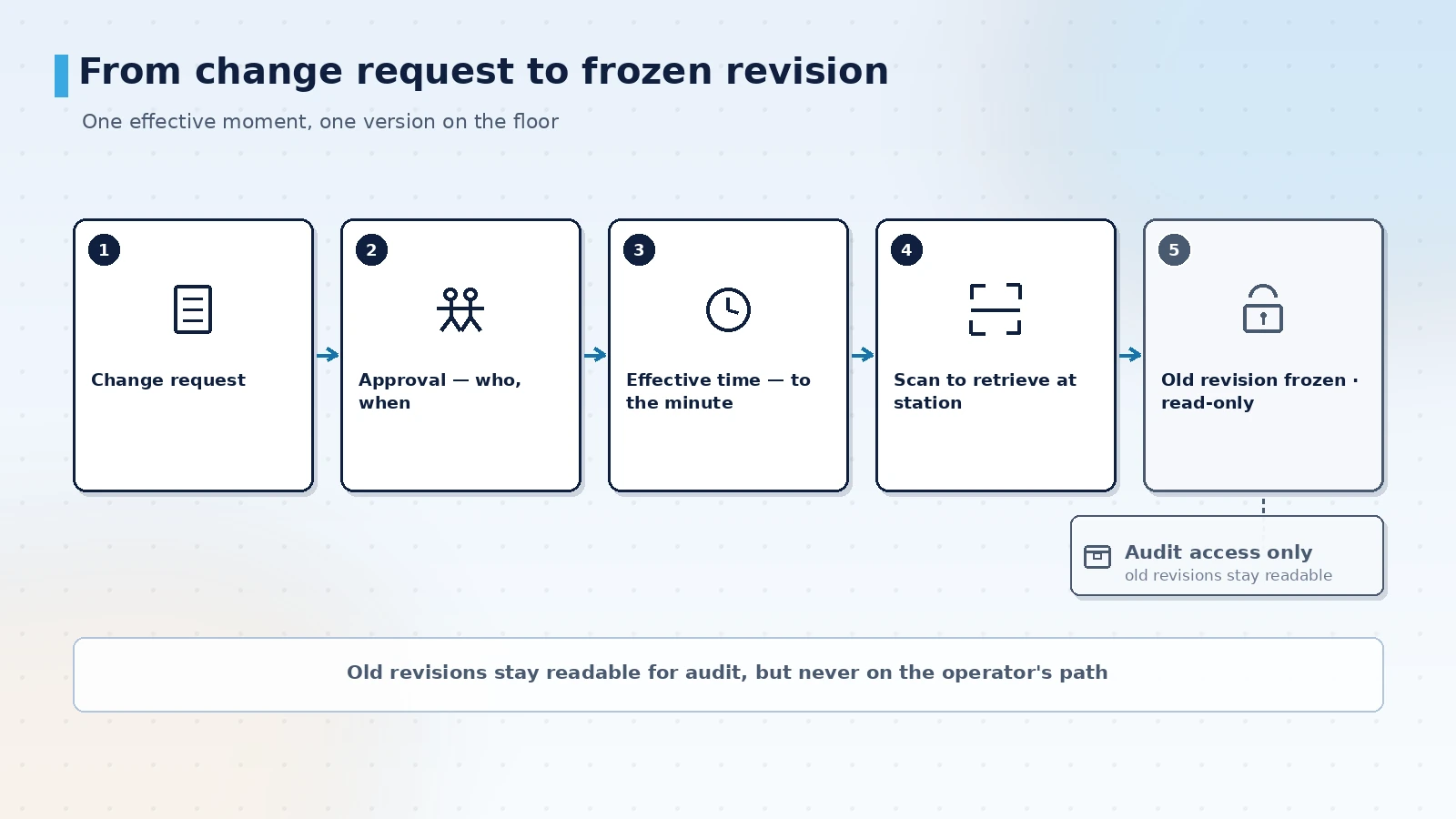
Getting the right version to the station
Distribution has to answer one question: which person, at which machine, sees which revision. Station terminals, tablets and barcode scanners act as the entry points. The operator scans a work order or product label, and the system returns the card for that model, operation and currently effective revision; when the line changes over, the content follows the work order instead of a manual folder search. In plants with unstable networks, cards and images should be cached locally so they remain readable and recordable offline, then uploaded with their original timestamps once the link recovers.
Version control is held by three rules. Changes go through approval that names who raised, who reviewed and when it takes effect. The effective time is a moment, not a date. The superseded version becomes read-only at that moment and stays available for audit. Plants running several languages have to treat language as part of the version: Chinese, English and Japanese cards for the same operation must be approved together, otherwise the same step carries different criteria on different screens.
- One entry point: work order label, product label or station ID as the retrieval key, so a station does not end up with two parallel paths.
- Effective moment: a new revision carries a switch time, changes automatically, and records before and after point to their own version numbers.
- Frozen history: superseded revisions turn read-only and remain retrievable for audits, but leave the operator's path.
- Role separation: editing, approval, distribution and read-only are separate roles; the station terminal can view and confirm only.
- Synchronised languages: all language versions of one revision are approved as a single release, and none ships with a language missing.
Error proofing, records and acceptance
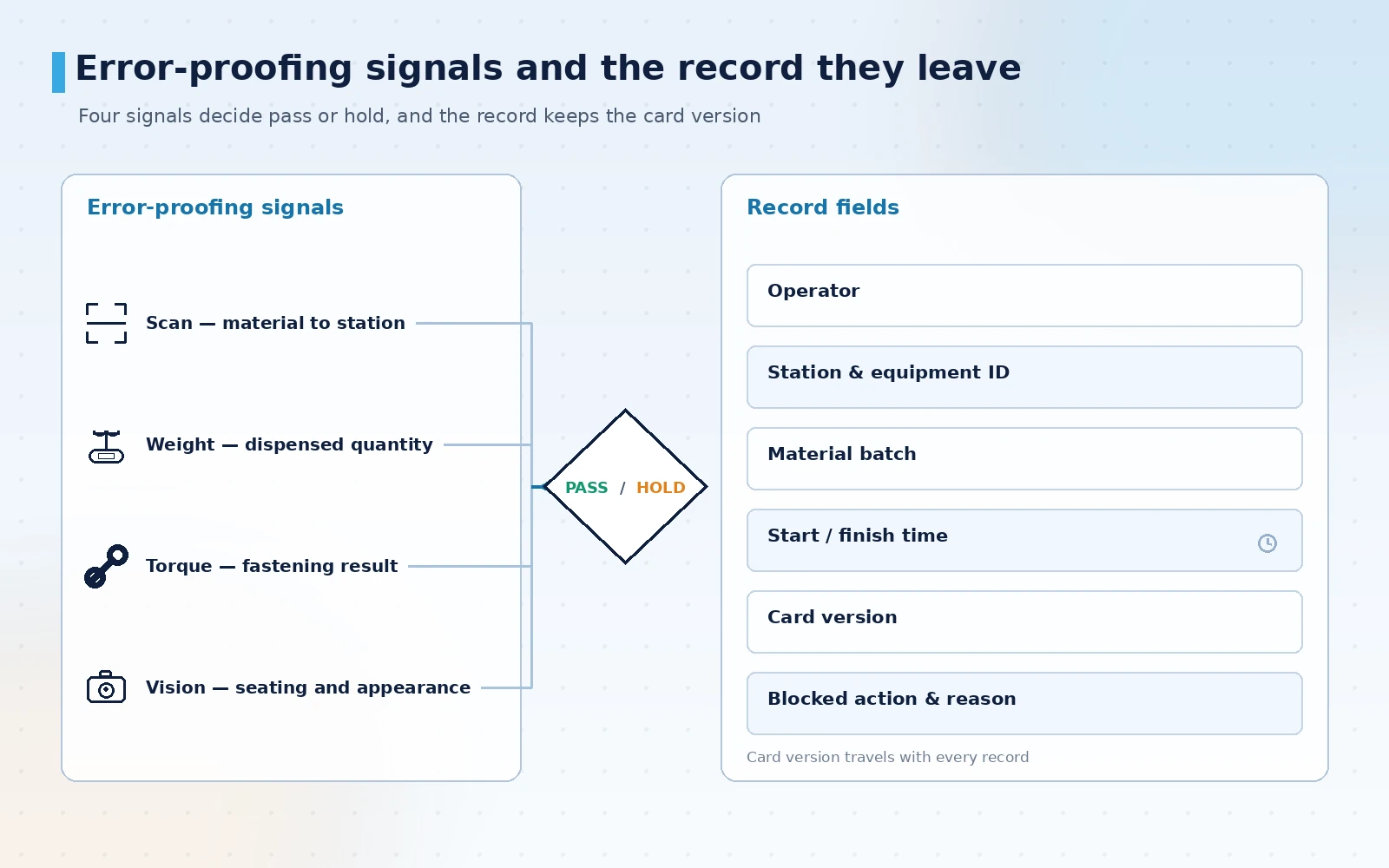
What digital instructions can prevent depends on which signal can verify the criterion. Barcode interlocks match material number to station, weighing compares dispensed quantity, torque tool data confirms fastening, vision checks seating and appearance, and PLC interlocks confirm machine state preconditions. The system then runs a sequence check on top of those signals: the next step is not released until the previous one reports a passing signal, and a blocked action is written into the record together with its reason, so it becomes input to improvement rather than a single alarm line.
Records should cover four dimensions: person, machine, material and time — operator, station and equipment ID, material batch, start and finish time — plus the version number of the card that was shown. Training and assessment modes can reuse the same cards for practice, with practice records stored separately so they never mix into production batches. Work involving action recognition is described as reserve and pilot work: vision-based layer-by-layer assembly feature checks are already deployed; action sequence and dwell recognition is close to usable but needs acceptance in the specific scenario; the plug-in route is still in progress and can be validated jointly within a project.
Acceptance is best done in four steps, each with an output that can be checked.
- Content review: pull three cards and check actions, parameters and criteria line by line against the process document, confirming that nothing depends on verbal explanation.
- Version drill: run one change and check the effective moment, the freeze of the old revision and the automatic switch on the terminal.
- Error-proofing test: for each criterion, run one passing and one failing sample, and confirm that blocking, prompting and recording agree.
- Records and offline mode: disconnect the network, confirm local caching, back-fill and timestamps, then export the audit trail and check it is continuous.
Fix the cards before choosing the terminal
Most outcomes of a digital work instruction project are decided during content work. If cards never reach one action per step, if criteria are adjectives, and if revisions have no effective rule, a better terminal only moves paper onto a screen. Get content breakdown, version rules and record fields right, and a tablet plus a barcode scanner can already produce an auditable loop.
Shanghai Orpaon Intelligent has worked on manufacturing digitalisation since 2009 and has accumulated more than 600 projects and solution practices. In work instructions and assembly error proofing, the team has delivered station-organised instructions and full-process traceability on household appliance and automotive parts lines, with interfaces in Chinese, English and Japanese, and implementation experience in overseas plants in East Asia. Such a system can be developed to fit existing process documents and equipment conditions, or piloted on one line or a few critical stations before wider rollout.
Discuss a work instruction project
If you are moving paper SOPs to station-level electronic instructions, bring your current process documents and station list; we will propose a content breakdown and a version rule set at operation level.
Contact Us